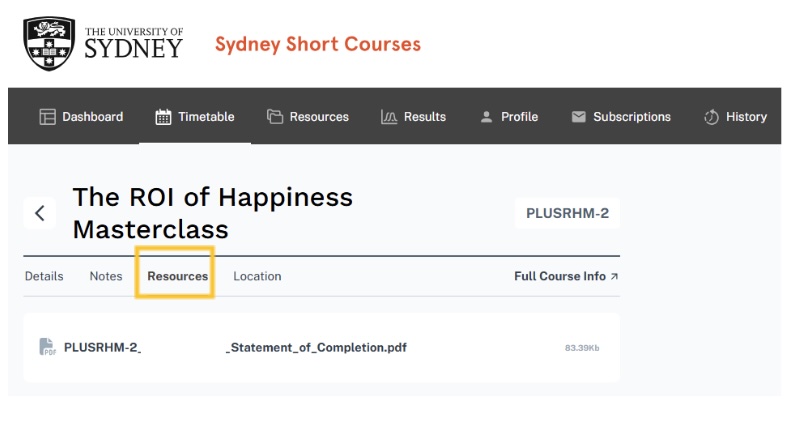

The student portal is your place to see your enrolled courses, download Statements of Completion and manage your contact details. Company logins can review related employee contacts, pay invoices and review provided company information.
Please note that the student portal is also referred to as "Skills OnCourse".
Use the Sydney Short Courses Portal Login to enter the portal. You can also access this in the top right-hand corner of every webpage under Student Login.
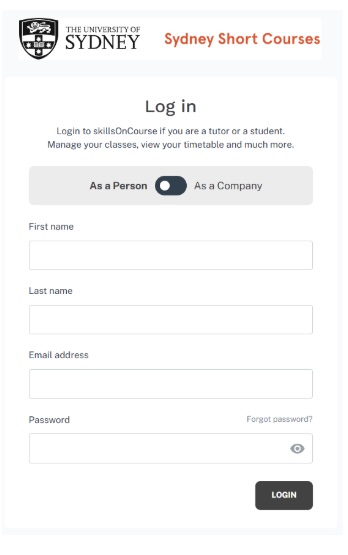
If this is your first time entering the portal, you will need to set a password in order to log in. You can do this by entering your first and last name, and email address, then clicking “Forgot password?”. You will be sent an email prompting you to click a link which will lead you to the set password window.
Important: You must have enrolled in a course with Sydney Short Courses and use the same first name, last name, and email address you used for enrolment to access your profile.
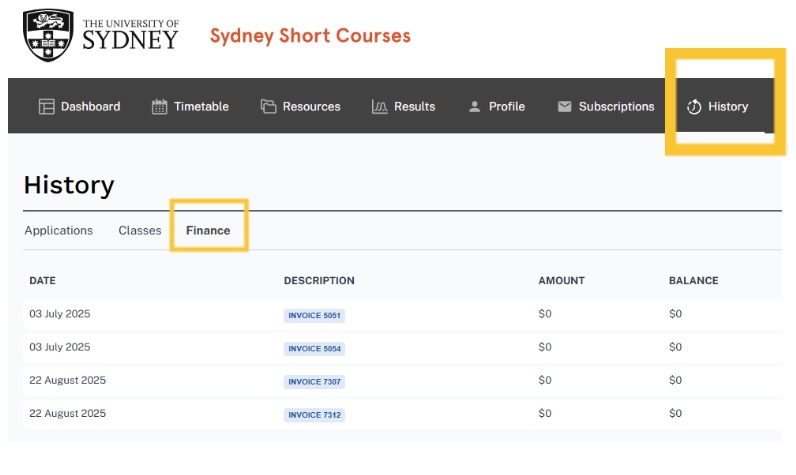
How to get a PDF copy of an invoice in the Portal
In the portal, click on the “History” tab, then the “Finance” tab to see your invoices. Click on your chosen invoice from the list to open a PDF copy.
How to get a PDF copy of a Statement of Completion in the Portal
In the portal, click on the “History” tab, then the “Classes” tab to see a list of classes you have completed.
Click on your chosen class from the list to open more information on the class, then click the resources tab and then click on the Statement of Completion to open a PDF copy.